EUDAPrep · EUDAMED registration workbench

EUDAMED registration data, prepared from the documents you already have.

EUDAPrep reads your IFUs, labels, and technical documentation, extracts the data EUDAMED needs, matches the right codes, and generates submission-ready files you upload directly.

See pricing → EU-hosted Built for the EU MDR and IVDR registration workflow
EUDAPrep submission interface showing field extraction and validation on a device record
How EUDAPrep works
01

Documents in, XML out.

Most EUDAMED tools assume you already have a clean device spreadsheet. Building that spreadsheet, hunting fields out of IFUs and labels, picking the right EMDN code for each device, is the work. EUDAPrep does that part: ingestion, extraction, code mapping, validation, export.

02

Pre-validated against the EC's published rules.

Every submission runs through the EC's schema and the EUDAMED business rules before XML export. Errors surface inside EUDAPrep, not after the upload fails.

03

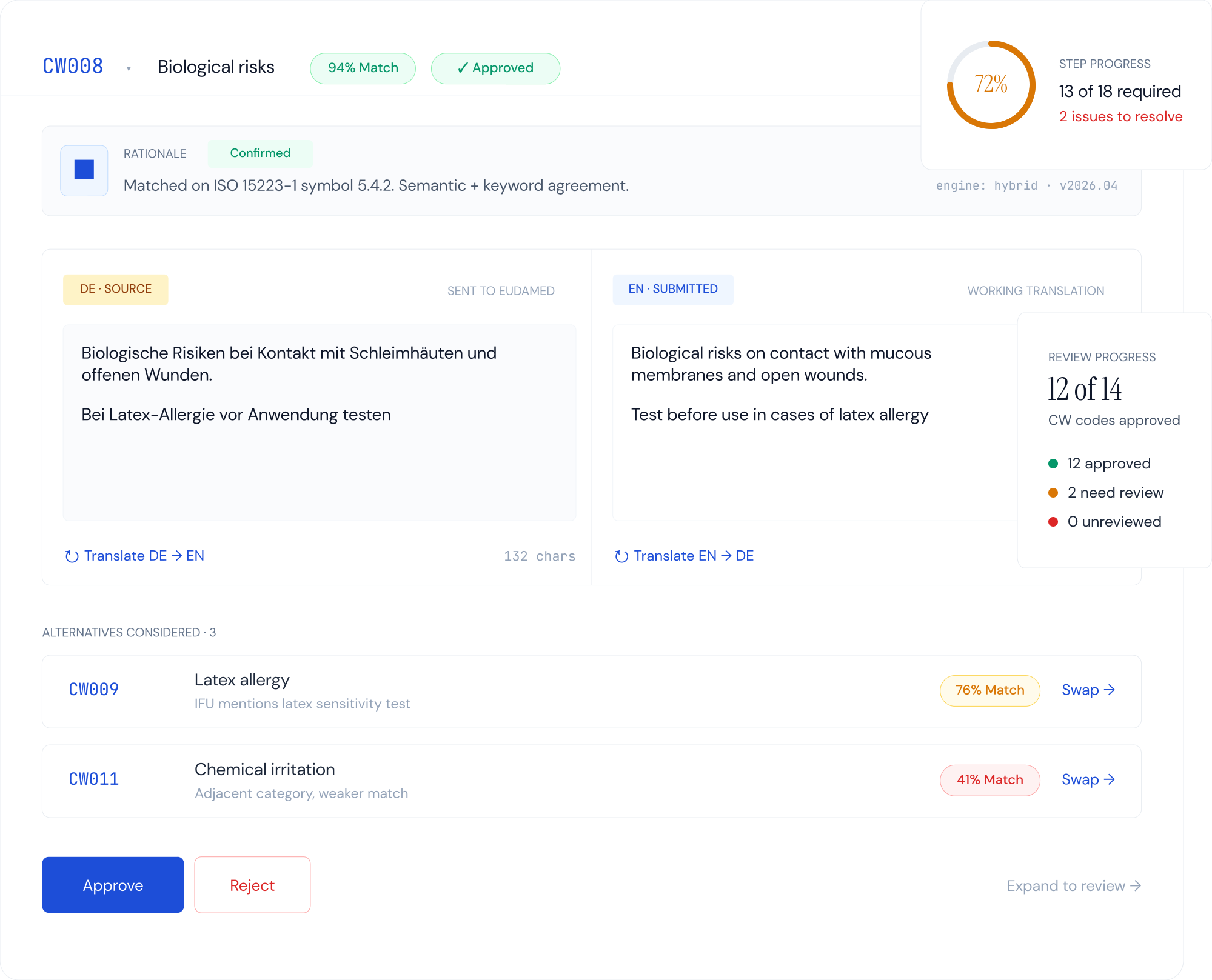
EMDN and codes from the official enumeration.

Codes are looked up, not generated. EUDAPrep proposes the most specific code in the EC's published EMDN list; you confirm before export. The EMDN snapshot is refreshed against the EC's published list whenever the EC publishes a new version, so submissions don't fail on retired codes.

04

A per-submission record.

Every device run through EUDAPrep produces a record of the source documents, the extracted values, the mapped codes, the validation results, and the final XML. The records stay with you and feed into your existing document management or QMS.

See it work

Four steps. One device or a portfolio.

Step 01

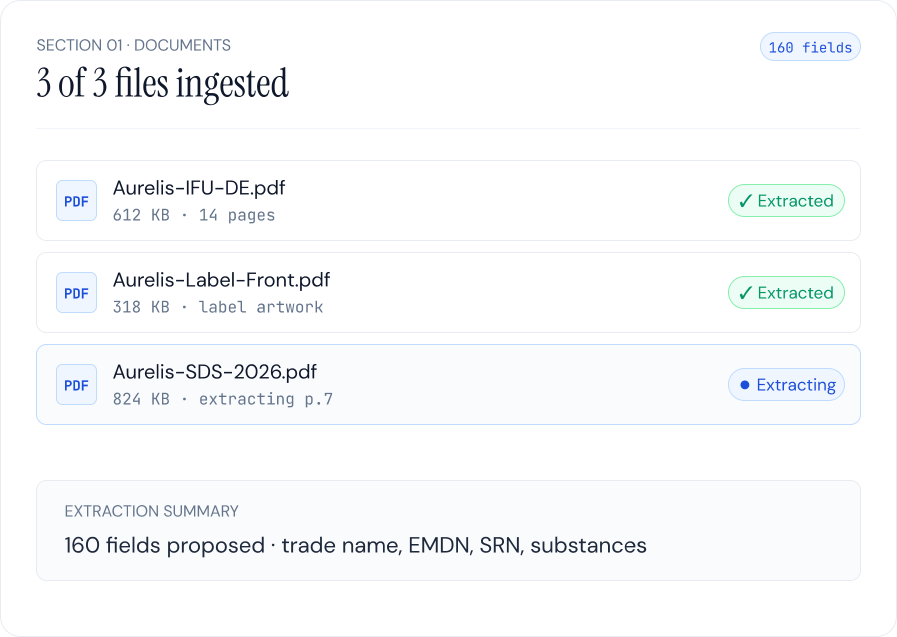
Drop in your documents.

IFUs, labels, safety data sheets, technical files. One device or a portfolio. EUDAPrep handles PDFs, Word, and structured spreadsheets.

EUDAPrep upload screen with device documents queued
Step 02

EUDAPrep proposes the EUDAMED data fields.

Extracted values are presented for review. Low-confidence values surface for closer attention before they ship.

EUDAPrep extraction review with low-confidence fields flagged
Step 03

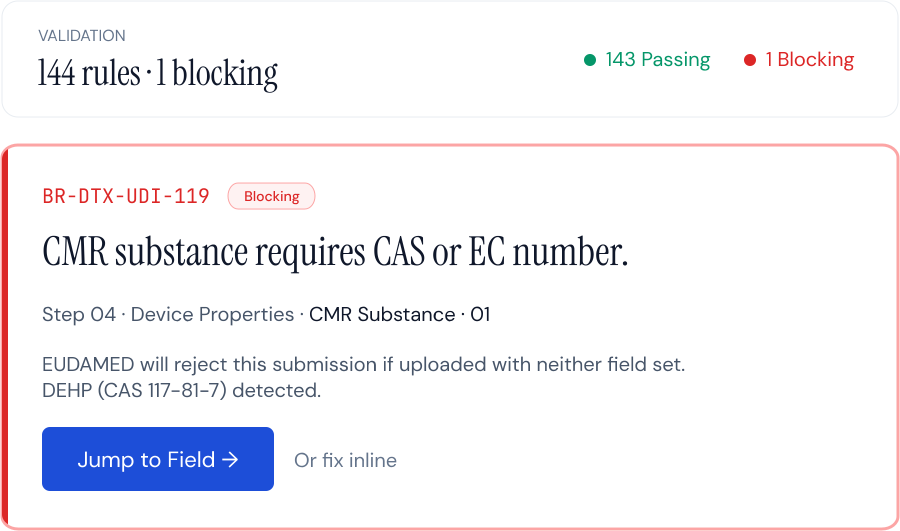
Schema and business-rule checks run before export.

The EC's schema and the EUDAMED business rules run inline. Failures surface against the field that caused them, not as a generic XML error.

EUDAPrep validation results against the EC business rules
Step 04

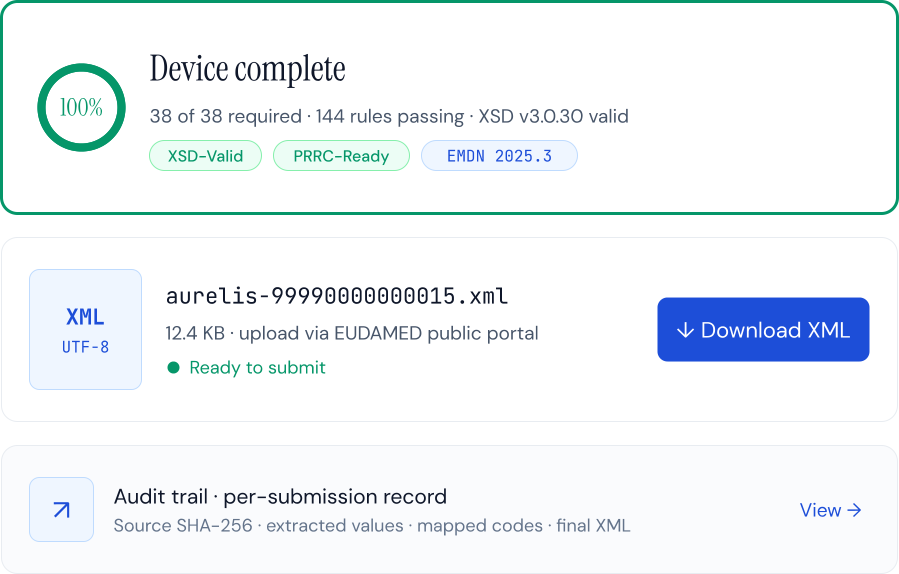
Validated XML downloads.

You upload it to EUDAMED through the EC interface. EUDAPrep produces files; the submission stays under your PRRC sign-off.

EUDAPrep export screen with validated EUDAMED XML ready to download
See pricing →
Who it's for

Two channels. Same product underneath.

For RA consultants

Take on more EUDAMED work without taking on more hours.

EUDAPrep handles per-device extraction, code mapping, and validation, so the time you spend per device collapses from full prep to review and sign-off. The freed capacity is yours to apply across more client portfolios. Per-submission records save themselves and stay portable to your QMS.

Subscription from €399/month 20% off annual
See consultant pricing →
For device manufacturers

Register your devices without watching the RA bill spiral.

EUDAPrep prepares the EUDAMED data from the product documentation you already have, so your RA reviews and signs off instead of retyping IFUs into spreadsheet cells. Pay per device for exactly the devices you have. No subscription, no expiry.

How it works in your org Your QA or Quality Engineer uploads documents and resolves the low-confidence flags; your RA or PRRC reviews the output and signs off. EUDAPrep handles the extraction, code matching, and EC validation in the middle. Expect consultant time per device to fall from full from-scratch prep to review hours, not to zero. The PRRC sign-off chain stays intact. We'll model the specific reduction against your portfolio in the walkthrough.
Sprint from €549 For up to 3 devices. One-time. No subscription.
See manufacturer pricing →
EUDAMED legacy-device deadline

Six months to the November deadline.

Legacy devices placed under MDD or AIMDD transitional provisions must complete EUDAMED registration by 28 November 2026, per EU 2024/1860. The per-device wrangling gets harder to find time for as the deadline closes, PRRC review queues get longer, and Notified Body visibility on incomplete portfolios gets sharper. The submissions prepared now land in normal working hours.

See pricing →
Questions worth answering

Frequently asked.

Operational
Does EUDAPrep submit registrations to EUDAMED for me?

No. EUDAPrep generates validated XML; you upload it through the EUDAMED interface. The PRRC retains documented responsibility for every submission.

What documents can EUDAPrep accept as input?

Instructions for use, labels, safety data sheets, technical files, declarations of conformity. PDF, Word, or structured spreadsheets. One device or a full portfolio.

How does EUDAPrep handle EMDN code mapping?

Codes come from the EC's official EMDN enumeration. EUDAPrep proposes a candidate code based on the device documentation; you confirm or change the candidate before XML export. The EMDN snapshot is refreshed against the EC's published list when the EC publishes a new version. More on how to pick an EMDN code.

Do I need to generate Basic UDI-DIs in EUDAPrep?

No. EUDAPrep does not issue Basic UDI-DIs. The issuing-entity authority sits with the designated issuing entities recognised by the EC: GS1, HIBCC, IFA, and ICCBBA. EUDAPrep validates the Basic UDI-DIs you've already assigned through one of these and carries them through to the EUDAMED submission. More on Basic UDI-DI assignment.

What role does the PRRC play with EUDAPrep?

The PRRC retains documented regulatory responsibility for every EUDAMED submission. EUDAPrep produces the validated XML and the per-submission record; PRRC sign-off attaches to those records.

What happens if a submission fails at EUDAMED?

The EC schema and business rule checks run before XML export, so schema-level rejections shouldn't reach EUDAMED. If a submission does fail at the EC end, the per-submission record shows the field that caused it so you can fix that field and re-export without redoing the rest.

Does EUDAPrep cover legacy device registration and IVDR?

Yes to both. The legacy-device rules under EU 2024/1860 are supported, including the EUDAMED-DI for devices that never had a UDI-DI. The EUDAMED schema covers MDR and IVDR registrations on the same structure.

Where is my data stored?

Hosted in the EU. Source documents are processed for extraction and validation; per-submission records are retained per the documented data policy.

Commercial
What's the difference between the Sprint and Subscription channels?

Sprint is a one-time, per-device purchase for a device manufacturer preparing their portfolio for the November 2026 deadline. Subscription is monthly or annual recurring with a submission cap, for RA consultants handling EUDAMED registrations across multiple clients. Same product underneath. See pricing for full tier detail.

Can I try EUDAPrep before paying?

There's no free trial today. If you have submissions you've already prepared, XML files, CSVs, or even a list of your field decisions, send them over and we'll run them through EUDAPrep's deterministic validation and tell you what surfaces. No charge, no obligation. Contact us to set this up.

Manufacturer, or RA consultant?

Two ways to buy. Pick the one that fits the work.